Sony LinkBuds S True Wireless Noise Canceling Earbuds
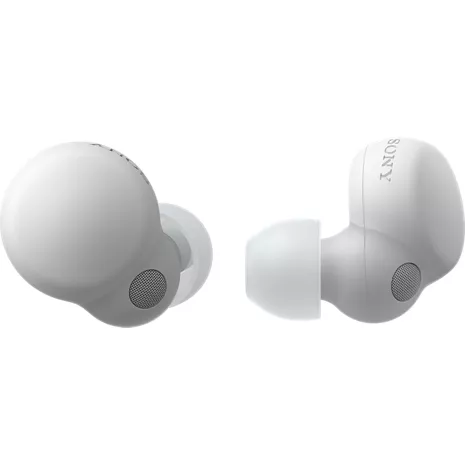

¹IPX4: Withstands splashing water. Do not submerge.
Reviews
3.7
143 reviews
68% of reviewers recommend this product.
Battery drain
Jamshid jam . 2 days ago
Sony North America Customer Support - 2 days ago
Hello there, Thank you for considering Sony products. We sincerely apologize for the battery issue you are experiencing with your WFLS900N earbuds. We understand how frustrating it must be to have one side drain rapidly while the other holds charge. To assist in resolving the issue of short battery life, we kindly ask you to follow these steps: 1. The available operating time is short, the battery power does not last long. For more information, please visit: https://helpguide.sony.net/mdr/linkbudss/v1/en/contents/TP1000541590.html 2. Reset the headset by following the instructions found here: https://helpguide.sony.net/mdr/linkbudss/v1/en/contents/TP1000541613.html 3. Initialize the headset to restore factory settings using the guidance provided at this link: https://helpguide.sony.net/mdr/linkbudss/v1/en/contents/TP1000541614.html 4. Lastly, ensure that your firmware is updated to Version 4.3.1 by following the instructions here: https://www.sony.com/electronics/support/wireless-headphones-bluetooth-headphones/linkbuds-s/software/00278796 We want to get this resolved for you! If the problem continues, the best next step is to contact our dedicated support team for advanced troubleshooting. You'll find all the necessary contact options and resources at this link: https://us.esupport.sony.com/support/s/support-contact?language=en_US&category=headphones Best regards, -Fredsony.com Originally posted on sony.com
Problematic
Chammert26 . 10 days ago
Sony North America Customer Support - 9 days ago
Hi Chammert26, Thank you for being a Sony owner for the past two years and for sharing such detailed feedback regarding your LinkBuds S. We are glad to hear you enjoy the sound quality and comfortable fit, but we are sincerely sorry to hear about the connectivity and battery issues you’ve encountered lately. To help resolve these frustrations and get your experience back on track, we recommend the following steps: 1- Please ensure you are using the Sony | Sound Connect app. Keeping your earbuds updated to the latest software version often resolves minor glitches and improves overall connection stability. 2- If the connection issues persist, a simple reset can often clear the internal memory without deleting your pairing information. You can find the step-by-step guide here: https://helpguide.sony.net/mdr/linkbudss/v1/en/contents/TP1000541613.html 3- If a reset does not work, the next step is to initialize the headset to restore its original factory settings. Please note that this will delete your pairing information and you will need to pair them to your devices again: https://helpguide.sony.net/mdr/linkbudss/v1/en/contents/TP1000541614.html If you have completed these steps and still find the performance unsatisfactory, we suggest contacting our dedicated technical support team for a more in-depth diagnostic: https://us.esupport.sony.com/support/s/support-contact?language=en_US&category=headphones We hope these steps help you return to the seamless listening experience you deserve. Thank you for considering Sony. Best regards, Dominicksony.com Originally posted on sony.com
Features
- Always on, automated audio
- Premium noise cancelling
- Immersive sound quality
- Ultra-clear call quality
- Long-lasting battery
- IPX4 water resistance¹
- Touch control settings
- Instant pause, instant play
- Manufacturer's 1-year limited warranty
SKU#
SKU#
WFLS900W
What's in the box
- Sony LinkBuds S True Wireless Noise Canceling Earbuds
- 5 sizes of earbud tips
- USB-C charging cable
- Warranty card
Sony LinkBuds S True Wireless Noise Canceling Earbuds Reviews
3.7
143 reviews
68% of reviewers recommend this product.
Battery drain
Jamshid jam . 2 days ago
Sony North America Customer Support - 2 days ago
Hello there, Thank you for considering Sony products. We sincerely apologize for the battery issue you are experiencing with your WFLS900N earbuds. We understand how frustrating it must be to have one side drain rapidly while the other holds charge. To assist in resolving the issue of short battery life, we kindly ask you to follow these steps: 1. The available operating time is short, the battery power does not last long. For more information, please visit: https://helpguide.sony.net/mdr/linkbudss/v1/en/contents/TP1000541590.html 2. Reset the headset by following the instructions found here: https://helpguide.sony.net/mdr/linkbudss/v1/en/contents/TP1000541613.html 3. Initialize the headset to restore factory settings using the guidance provided at this link: https://helpguide.sony.net/mdr/linkbudss/v1/en/contents/TP1000541614.html 4. Lastly, ensure that your firmware is updated to Version 4.3.1 by following the instructions here: https://www.sony.com/electronics/support/wireless-headphones-bluetooth-headphones/linkbuds-s/software/00278796 We want to get this resolved for you! If the problem continues, the best next step is to contact our dedicated support team for advanced troubleshooting. You'll find all the necessary contact options and resources at this link: https://us.esupport.sony.com/support/s/support-contact?language=en_US&category=headphones Best regards, -Fredsony.com Originally posted on sony.com
Problematic
Chammert26 . 10 days ago
Sony North America Customer Support - 9 days ago
Hi Chammert26, Thank you for being a Sony owner for the past two years and for sharing such detailed feedback regarding your LinkBuds S. We are glad to hear you enjoy the sound quality and comfortable fit, but we are sincerely sorry to hear about the connectivity and battery issues you’ve encountered lately. To help resolve these frustrations and get your experience back on track, we recommend the following steps: 1- Please ensure you are using the Sony | Sound Connect app. Keeping your earbuds updated to the latest software version often resolves minor glitches and improves overall connection stability. 2- If the connection issues persist, a simple reset can often clear the internal memory without deleting your pairing information. You can find the step-by-step guide here: https://helpguide.sony.net/mdr/linkbudss/v1/en/contents/TP1000541613.html 3- If a reset does not work, the next step is to initialize the headset to restore its original factory settings. Please note that this will delete your pairing information and you will need to pair them to your devices again: https://helpguide.sony.net/mdr/linkbudss/v1/en/contents/TP1000541614.html If you have completed these steps and still find the performance unsatisfactory, we suggest contacting our dedicated technical support team for a more in-depth diagnostic: https://us.esupport.sony.com/support/s/support-contact?language=en_US&category=headphones We hope these steps help you return to the seamless listening experience you deserve. Thank you for considering Sony. Best regards, Dominicksony.com Originally posted on sony.com
Bad Quality
kulitskaya . 11 days ago
Sony North America Customer Support - 10 days ago
Hi kulitskaya, Thank you for sharing your experience with the LinkBuds S. We're sorry to hear about the noise and battery issues you've encountered. Let's work together to resolve these concerns. -Reset the earbuds: place one earbud in the case and hold the reset button for 20 seconds until the light flashes orange and turns off. Once that's done, simply take that one out and repeat the exact same process with the second earbud. https://helpguide.sony.net/mdr/linkbudss/v1/en/contents/TP1000541613.html -Initialize the earbuds: put the headset in the case and hold the button for about 15 seconds until the light starts flashing orange. As soon as you see that orange light, let go within 5 seconds, and once you see the green light flash 4 times, you’ll know everything is successfully reset to factory settings. https://helpguide.sony.net/mdr/linkbudss/v1/en/contents/TP1000541614.html -To save your battery, just try turning off Noise Canceling, Speak-to-Chat, and high-quality settings like LDAC when you don't really need them. These features use extra power to process sound, so switching them off is the quickest way to get more hours out of a single charge. If you'd like to try more, you can find extra tips and troubleshooting steps at the links below. https://www.sony.com/electronics/support/wireless-headphones-bluetooth-headphones/linkbuds-s/articles/00278105 https://helpguide.sony.net/mdr/linkbudss/v1/en/contents/TP1000541590.html If these steps don't resolve the issues, please reach out to our support team for further assistance: https://www.sony.net/support-contact Thanks for considering Sony and letting us know about these issues. Warm regards, Estefanysony.com Originally posted on sony.com
TERRIBLE PRODUCT
lobster50 . 26 days ago
Sony North America Customer Support - 25 days ago
Thank you for sharing your feedback, Lobster50. We are truly sorry to hear about the battery and overheating issues you're experiencing with your LinkBuds S. That is definitely not the performance we expect, especially with the orange blinking light indicating a charging error. To help resolve this, please try a factory reset to recalibrate the battery software. If the overheating persists, please contact our support team immediately at https://us.esupport.sony.com/support/s/support-contact?language=en_US&category=headphones so we can look into this for you. We appreciate you bringing this to our attention. Best regards, Gus, Sony North America Customer Supportsony.com Originally posted on sony.com
The price doesn't justice for only a year of use
Pat71d . 4 months ago
Sony North America Support - 4 months ago
Hi Pat71d, We sincerely apologize that you are experiencing such a rapid and significant loss of battery life in your WF-LS900N earbuds so shortly after the one-year mark. We understand your frustration, especially given your light usage. We strongly recommend performing a complete initialization (factory reset) https://www.sony.com/electronics/support/articles/00278109 as this can sometimes correct internal charging errors. If the issue is not resolved after the reset, please contact our dedicated support team again. They can provide the necessary service procedures for out-of-warranty repairs and guide you through the next steps for evaluation. Thanks for choosing Sony. Best regards, Eliabsony.com Originally posted on sony.com
Poor Quality
tkuepfer . 4 months ago
Sony North America Customer Support - 4 months ago
Hi tkuepfer, Thanks for reaching out to us about your Linkbuds S. We're truly sorry to hear you're running into these battery, connectivity and Noise Canceling issues. We can certainly give you some steps that often resolve these types of problems: 1) Open the Sony | Sound Connect app on your phone and make sure the earbuds have the latest firmware installed. 2) Reset and Initialize the earbuds. Find detailed instructions here: https://helpguide.sony.net/mdr/linkbudss/v1/en/contents/TP1000541613.html https://helpguide.sony.net/mdr/linkbudss/v1/en/contents/TP1000541614.html If the issues persist after trying these steps, we recommend checking online for a local electronic repair center near you. They might be able to help you get your product back in working order. We appreciate your review of our Sony product and apologize for your experience. Warm regards, Estefanysony.com Originally posted on sony.com
Bad Battery Quality
KaylaS . 4 months ago
Sony North America Customer Support - 4 months ago
Hi there, Thanks so much for taking the time to share your experience with your LinkBuds S. We really appreciate you bringing this to our attention, and we're genuinely sorry to hear that the battery in your right earbud started having issues after only a year. Before looking at a repair, let's run through a couple of basic troubleshooting steps to try to fix this problem: 1) Initialize the earbuds: This returns the earbuds to their factory settings and often fixes unexpected issues. You can find the steps to initialize the Linkbuds S here: https://helpguide.sony.net/mdr/linkbudss/v1/en/contents/TP1000541614.html 2) Update the Firmware: Always make sure your earbuds have the latest firmware installed via the Sony | Sound Connect app. If those steps don't resolve the issue and the right earbud still isn't holding a charge, then a physical repair might be necessary. We suggest contacting our authorized service center, Encompass, for repair services. They are equipped to handle Sony products. You can find their contact information and begin the repair process here: https://sony.encompass.com/parts-accessories/Sony-Repair-Services If Encompass isn't able to assist or the process doesn't work out for you, checking with any other local servicer near you, as you mentioned, is a smart move to get your earbuds back to full working order quickly. We appreciate your review of our Sony product and apologize for your experience. Sincerely, Estefanysony.com Originally posted on sony.com
Poor Lifespan
ZbLog . 5 months ago
Sony North America Customer Support - 5 months ago
Hi ZbLog, We sincerely apologize that the battery life on your LinkBuds S has dropped off so significantly. We're ready to help and would be happy to walk you through some troubleshooting steps. 1. Fully reset the earbuds. You can find the instructions here: https://helpguide.sony.net/mdr/linkbudss/v1/en/contents/TP1000541614.html 2. Always make sure the firmware is completely up-to-date. https://www.sony.com/electronics/support/wireless-headphones-bluetooth-headphones/linkbuds-s/software/00278796 3. Make sure the charging contacts on both the earbuds and inside the case are clean and dry. If you've tried these steps and the issue persists, your next step would be to look into a repair. For official Sony repair service, we recommend reaching out to Encompass Supply Chain Solutions, which is our authorized service partner. You can find their repair services information here: https://sony.encompass.com/parts-accessories/Sony-Repair-Services If Encompass is unable to assist with the repair, you may also look into other options. Check your local Yellow Pages business directory for other electronic repair services near you that might be able to help. Thanks for considering Sony and for bringing this to our attention. Sincerely, Estefanysony.com Originally posted on sony.com
El peor error, comprar productos SONY.
Silvia Elena . 5 months ago
Sony North America Customer Support - 5 months ago
Hola, Gracias por contactarnos. Comprendemos perfectamente su frustración y lamentamos enormemente la experiencia tan decepcionante que ha tenido con sus LinkBuds S. De verdad, nos apena mucho que se sienta tan defraudado con un producto de Sony, especialmente después de haber confiado en nuestra marca. Sobre su solicitud de reparación, una vez que la garantía oficial de un año expira, como es su caso con la fecha de compra, la única opción que podemos ofrecerle es el servicio de reparación a través de nuestro centro de servicio técnico autorizado. Entendemos que la respuesta previa no fue satisfactoria y pedimos disculpas por eso. Puede contactar a nuestro socio oficial de servicio, Encompass, quienes manejan este tipo de reparaciones. Puede encontrar la información de contacto y detalles sobre el proceso aquí: https://sony.encompass.com/parts-accessories/Sony-Repair-Services Ahora, si por alguna razón Encompass no puede realizar la reparación o si prefiere buscar opciones más locales, le sugerimos que revise en las Páginas Amarillas de su zona para encontrar talleres de reparación de electrónica cerca de usted. Gracias por considerar productos Sony y por su valiosa opinión. Sinceramente, Estefanysony.com Originally posted on sony.com
Surprisingly Amazing
Unhappypickle07 . 5 months ago
Sony North America Customer Support - 5 months ago
Thank you for your fantastic review, Unhappypickle07! We are absolutely thrilled to hear that your new LinkBuds S earbuds are performing above your expectations. It's the highest compliment to know that you find the sound quality and noise canceling rivaling your WH-1000XM4 over-ear headphones, especially considering the LinkBuds S are a much smaller package designed for all-day comfort. We appreciate you choosing Sony for your portable audio needs! Best regards, Gus, Sony North America Customer Supportsony.com Originally posted on sony.com
Sony LinkBuds S True Wireless Noise Canceling Earbuds FAQs
Mike . Mar 17, 2024
has the battery issue been resolved?
Please reach out to manufacturer for more information. ~Peter
Tim Wms . Sep 24, 2023
Do these ear buds come with a case ? How are they going to charge
TxHolly . Sep 18, 2023
Can you answer calls with these?
Alexa enabled . Aug 8, 2023
Are these buds Alexa enabled?