Samsung Galaxy Buds3
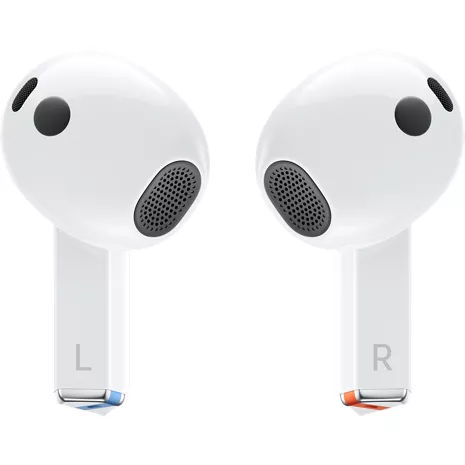
Color

Free returns within 30 days.Details
Get it fast
Free 2 Day Shipping
Free Express Pickup
Select a storeAdaptive Equalizer.
Galaxy Buds3 delivers immersive audio quality using Adaptive Equalizer with Galaxy AI¹ that personalizes sounds based on how you wear them.
Real-time interpreter.
Hear translations through your Galaxy Buds during face-to-face conversations and on calls. ²
ANC.
Hear the audio you love and tune out unwanted sounds with Active Noise Cancellation.
Comfortable fit with a new design.
From working to working out, enjoy all-day comfort with Galaxy Buds3.
Crystal sound.
Experience crystal-clear sound in all you do, from phone conversations with friends to listening
to a new playlist during your morning workout routine. ³
Intuitive touch control.
Program your Galaxy Buds controls to do what you want — pause, skip, accept calls and more
— with Intuitive Touch Control.4
Durability.
Stay active with Galaxy Buds3 that stand up to your day.
Smart Things Find.
Did you drop your Buds, and now you're not sure where they are? SmartThings Find will lead
you to the place where they got left behind.5
PC Auto Switch.
Keep the beat across every device, from phone to TV to PC.6
TV 360 Audio.
Enjoy your TV's cinematic sound using Galaxy Buds3 Series. You'll hear every detail instunning clarity with a 360-degree listening experience.7
¹ Requires initial setup via Samsung Wear app on compatible device.
² Requires compatible Galaxy device. Samsung account login and language preset (English and Spanish pre-installed; other languages require free download). Results may vary.
³. Requires a compatible Galaxy phone and One UI 4.0 or later with 1.5GB RAM or above.
4 Requires compatible smartphone.
5 Requires a smartphone with the SmartThings app and a Wi-Fi or Bluetooth connection. Compatible smart devicesmust be initially set up in the SmartThings app.
6 Requires compatible smartphone. Feature supported on Galaxy Book series PCs launched 2020 or later and TVmodels launched 2022 or later.
7 Feature supported on Samsung TV models launched 2022 or later.
Reviews
3.8
2125 reviews
49% of reviewers recommend this product.
Were good until warranty was expired.
NoMas . 2 days ago
R&R - 10 hours ago
Hi NoMas, Thank you for sharing your experience after prolonged use. We recognize how important it is to have high-quality audio products for daily communication and listening, and long-term feedback helps us understand how performance expectations change with everyday use. Regarding your earbuds microphone issue, which occurred just outside the standard warranty, please be aware that eligible devices can benefit from additional coverage through Samsung Care+. This extended support provides extra protection. To determine your eligibility and enrollment, please contact our Samsung Support Team. We sincerely appreciate your wonderful review and thank you for choosing Samsung. Samsung Care+ https://www.samsung.com/us/support/samsung-care-plus/ -Ty Samsung Support smsng.us/Samsung-Support Samsung Community smsng.us/Samsung-Community Facebook smsng.us/Facebook-Messenger X https://smsng.us/X-MessagesSamsung US Originally posted on Samsung US
not what I thought
does not fit . 9 days ago
R&R - 6 days ago
Hello there, Thank you for sharing your thoughts on the Galaxy Buds3. We're glad to hear you enjoyed the sound quality, a key strength of the Buds lineup. Galaxy Buds are crafted to accommodate different listening preferences, offering a unique approach to audio performance and design. The Galaxy Buds3 are open-type earbuds, not canal-type, so they lack ear tips. To start, simply place them in your ears, checking the bottom for directional markings, L and R. Insert the R bud into your right ear with the R facing outward, and the L bud into your left ear with the L facing outward. Tilt the blades slightly so the microphones on the bottom point toward your mouth rather than straight down. You can adjust the fit by rotating the buds forward and backward until comfortable. For best results, refer to the online guide on fitting your Galaxy Buds3. We value your feedback as we strive to enhance design and sound quality. Thank you for choosing Samsung. -Ty Samsung Support smsng.us/Samsung-Support Samsung Community smsng.us/Samsung-Community Facebook smsng.us/Facebook-Messenger X https://smsng.us/X-MessagesSamsung US Originally posted on Samsung US
Features
- Adaptive Equalizer
- Real-time interpreter
- ANC
- Comfortable fit with new design
- Crystal sound
- Intuitive touch control
- Durable design
- Smart Things Find
- PC Auto Switch
- TV 360 Audio
SKU#
SKU#
SM-R530NZWAXAR
What's in the box
- Samsung Galaxy Buds3
Samsung Galaxy Buds3 Reviews
3.8
2125 reviews
49% of reviewers recommend this product.
Were good until warranty was expired.
NoMas . 2 days ago
R&R - 10 hours ago
Hi NoMas, Thank you for sharing your experience after prolonged use. We recognize how important it is to have high-quality audio products for daily communication and listening, and long-term feedback helps us understand how performance expectations change with everyday use. Regarding your earbuds microphone issue, which occurred just outside the standard warranty, please be aware that eligible devices can benefit from additional coverage through Samsung Care+. This extended support provides extra protection. To determine your eligibility and enrollment, please contact our Samsung Support Team. We sincerely appreciate your wonderful review and thank you for choosing Samsung. Samsung Care+ https://www.samsung.com/us/support/samsung-care-plus/ -Ty Samsung Support smsng.us/Samsung-Support Samsung Community smsng.us/Samsung-Community Facebook smsng.us/Facebook-Messenger X https://smsng.us/X-MessagesSamsung US Originally posted on Samsung US
not what I thought
does not fit . 9 days ago
R&R - 6 days ago
Hello there, Thank you for sharing your thoughts on the Galaxy Buds3. We're glad to hear you enjoyed the sound quality, a key strength of the Buds lineup. Galaxy Buds are crafted to accommodate different listening preferences, offering a unique approach to audio performance and design. The Galaxy Buds3 are open-type earbuds, not canal-type, so they lack ear tips. To start, simply place them in your ears, checking the bottom for directional markings, L and R. Insert the R bud into your right ear with the R facing outward, and the L bud into your left ear with the L facing outward. Tilt the blades slightly so the microphones on the bottom point toward your mouth rather than straight down. You can adjust the fit by rotating the buds forward and backward until comfortable. For best results, refer to the online guide on fitting your Galaxy Buds3. We value your feedback as we strive to enhance design and sound quality. Thank you for choosing Samsung. -Ty Samsung Support smsng.us/Samsung-Support Samsung Community smsng.us/Samsung-Community Facebook smsng.us/Facebook-Messenger X https://smsng.us/X-MessagesSamsung US Originally posted on Samsung US
Great Sound but Battery Does Not Last
clab . 10 days ago
Samsung US Originally posted on Samsung US
It doesn't fit my ears at all!
Wisly . 10 days ago
R&R - 7 days ago
Hi there Wisly, Thank you for your feedback. Galaxy Buds3 have a sleek design focused on comfort and ease of use for many users. Properly fitting your earbuds improves sound quality, ensures comfort, and helps prevent them from falling out. Incorrect placement can cause discomfort, sound leaks, and increase the risk of losing an earbud, especially during activities like jogging. Unlike canal models, these open-type earbuds don't have ear tips. To wear them, simply place them in your ears and check for the L and R markings at the bottom. Insert the R earbud into your right ear with R facing you, and do the same with the L in your left ear. Tilt the stem slightly so the microphone points toward your mouth rather than downward. Adjust the fit by rotating the earbuds until they feel comfortable. Since ear shapes and fit preferences vary, your feedback helps us improve. We’ve linked a resource below to help you achieve a good fit with your Galaxy Buds3. Your insights contribute to ongoing design improvements across the Galaxy product line. Thank you for your review and for choosing Samsung. How to wear your Samsung Galaxy Buds3, Buds3 Pro, or Buds3 FE https://www.samsung.com/us/support/answer/ANS10003519/ -Ty Samsung Support smsng.us/Samsung-Support Samsung Community smsng.us/Samsung-Community Facebook smsng.us/Facebook-Messenger X https://smsng.us/X-MessagesSamsung US Originally posted on Samsung US
Fall Out!
Terry . 17 days ago
R&R - 13 days ago
Hey Terry, Thank you for your feedback. Galaxy Buds3 combine cutting-edge audio with a sleek, lightweight design. Feeling how they fit during natural movement helps Samsung improve comfort-focused designs while maintaining high sound quality and smart features. Proper fit is crucial for better sound, comfort, and secure placement. Improper wearing can lead to discomfort, sound leaks, and falling out, especially during activities like jogging. Ensure a good fit to avoid losing an earbud. Since Galaxy Buds3 are open-type earbuds without ear tips, simply place them in your ears. Check for the L and R markings on the bottom. Insert the R earbud into your right ear with the R facing you, and the L into your left with the L facing you. Slightly angle the earbuds so the microphone points toward your mouth, not straight down. Adjust fit by rotating the earbuds until comfortable. See the linked online article for more details. We value your feedback and thank you for choosing Samsung. How to wear your Samsung Galaxy Buds3, Buds3 Pro, or Buds3 FE https://www.samsung.com/us/support/answer/ANS10003519/ -Ty Samsung Support smsng.us/Samsung-Support Samsung Community smsng.us/Samsung-Community Facebook smsng.us/Facebook-Messenger X https://smsng.us/X-MessagesSamsung US Originally posted on Samsung US
uncomfortable
Inconvenient . 19 days ago
R&R - 18 days ago
Hello there, Thank you for sharing your experience with Galaxy Buds3. These earbuds feature a lightweight design and contemporary style, making them suitable for daily use. Your feedback highlights how personal comfort preferences influence the listening experience and offers valuable insights for Samsung's future developments. We appreciate your input and thank you for choosing Samsung. -Ty Samsung Support smsng.us/Samsung-Support Samsung Community smsng.us/Samsung-Community Facebook smsng.us/Facebook-Messenger X https://smsng.us/X-MessagesSamsung US Originally posted on Samsung US
Garbage buds
HeadphoneWizard . 23 days ago
R&R - 21 days ago
Hi there HeadphoneWizard, Wearing your earbuds correctly is crucial for multiple reasons. It enhances sound quality, provides a comfortable fit, and prevents them from falling out. Incorrect wearing can lead to discomfort, sound leaks, and increased chances of dropping them, especially during activities like jogging. Ensure proper fit by placing the Galaxy Buds3, which are open-type earbuds without ear tips, into your ears. Look for the directional marks—L and R—on the bottom. Insert the R earbud into your right ear with the R facing you, and the L into your left with the L facing you. Slightly tilt the earbuds so the microphone points toward your mouth rather than straight down. Adjust the fit by rotating them until comfortable. For more tips on the perfect fit, check the linked online article about the Galaxy Buds3 Pro. Thank you for your review. We’re happy to have you as part of the Samsung community. How to wear your Samsung Galaxy Buds3, Buds3 Pro, or Buds3 FE https://www.samsung.com/us/support/answer/ANS10003519/ -Ty Samsung Support smsng.us/Samsung-Support Samsung Community smsng.us/Samsung-Community Facebook smsng.us/Facebook-Messenger X https://smsng.us/X-MessagesSamsung US Originally posted on Samsung US
Terribly uncomfortable
0000 . 23 days ago
R&R - 21 days ago
Hi 0000, Thank you for sharing your detailed experience with Galaxy Buds3. These earbuds are crafted to provide smart features and dependable performance all day long. Wearing them correctly is important for several reasons. It improves sound quality, enhances comfort, and keeps them securely in your ears. Improper use can lead to discomfort, sound leaks, and the risk of falling out. No one wants to lose an earbud, especially while jogging, so ensure you wear them with the right fit. The Galaxy Buds3 are open-type earbuds rather than canal types, so they don’t have ear tips. To use them, simply place them in your ears. Check the bottom of each earbud for directional marks—L and R. Insert the R earbud into your right ear with the R facing out, and the L earbud into your left ear with the L facing out. Angle the stem slightly so that the microphone on the bottom points toward your mouth rather than directly down. You can adjust the fit by rotating the earbuds forward or backward until they feel comfortable. For more tips on achieving a good fit with your Galaxy Buds3, check out the online article linked below. Feedback about comfort during longer listening sessions highlights how design details can impact wearability over time. Thank you for choosing Samsung. How to wear your Samsung Galaxy Buds3, Buds3 Pro, or Buds3 FE https://www.samsung.com/us/support/answer/ANS10003519/ -Ty Samsung Support smsng.us/Samsung-Support Samsung Community smsng.us/Samsung-Community Facebook smsng.us/Facebook-Messenger X https://smsng.us/X-MessagesSamsung US Originally posted on Samsung US
great sound!
A Clemons . 23 days ago
R&R - 17 days ago
Hi there A Clemons, Thank you for sharing your experience with Galaxy Buds3. These earbuds are designed to be sleek and lightweight, offering clear sound quality even when worn in only one ear. Your feedback highlights how the design helps maintain situational awareness while providing an enjoyable listening experience during everyday activities. We appreciate your preference for Samsung. -Ty Samsung Support smsng.us/Samsung-Support Samsung Community smsng.us/Samsung-Community Facebook smsng.us/Facebook-Messenger X https://smsng.us/X-MessagesSamsung US Originally posted on Samsung US
Good
Sridee . 23 days ago
R&R - 21 days ago
Hi Sridee, Thank you for sharing your thoughts on Galaxy Buds3. A secure fit is especially important for users who enjoy listening while staying active. Since the Galaxy Buds3 are open-type earbuds rather than canal styles, they lack earbud tips. To start, simply place them in your ears. Check the bottom of the earbuds for directional marks—L and R. Insert the R earbud into your right ear with the R facing you, and the L into your left ear with the L facing you. Slightly angle the blade so the microphone on the bottom points toward your mouth, not straight down. Adjust the fit by rotating the earbuds forward and backward until comfortable. Your feedback highlights how performance can vary with activity level and personal fit preferences. Please see our online article linked below for tips on achieving the perfect fit with your Galaxy Buds3. We value your feedback and thank you for being a Samsung customer. -Ty Samsung Support smsng.us/Samsung-Support Samsung Community smsng.us/Samsung-Community Facebook smsng.us/Facebook-Messenger X https://smsng.us/X-MessagesSamsung US Originally posted on Samsung US
Samsung Galaxy Buds3 FAQs
Compatibility . Oct 8, 2025
Are these compatible with an S23?
Yes, the Samsung Galaxy Buds3 are compatible with an S23. -Red
Joann . Aug 30, 2025
are they compatible with Galaxy watch
Yes. ~Peter
Camponero . Jun 29, 2025
Do these connect with the galaxy S 22 ultra?
These headphones are compatible with the S22 Ultra. -Jazzy
Voldemort . Jan 7, 2025
Do they support wireless charging
Yes, Samsung Galaxy Buds3 support wireless charging. -Dee
Duane . Aug 15, 2024
Which samsung phones are compatible.
Tap on the link below to check device compatibility: https://www.verizon.com/products/samsung-galaxy-buds3/ ~Maria
Benny . Aug 8, 2024
Languages supported?
Samsung Galaxy Buds3 come with English and Spanish pre-installed as language presets, and other languages can be downloaded for free. The Galaxy Buds3 also have an Interpreter mode that can translate foreign languages directly into the user's ears. This feature supports over a dozen languages, including Chinese, French, German, Japanese, Korean, Spanish, and Thai, and has two modes: Listening and Conversation. Listening mode provides one-way translation, while Conversation mode is designed for two-way translation during face-to-face conversations. -Joe
MULTIPLE PHONE USAGE . Aug 5, 2024
Can they support 2 phones at once?
No, they can be used on one device at a time. ~Freddy
TimfromSC . Jul 30, 2024
What languages does it support for translate ?
Chinese (simplified), English, French, German, Hindi, Italian, Japanese, Korean, Polish, Portuguese, Spanish, Thai, and Vietnamese are supported languages. More information here: http://spr.ly/6429cxkYd. http://spr.ly/6420cxkYe ~Maria
EAM78 . Jul 25, 2024
Do the come with different size ear pieces
Your Galaxy Buds2 come with extra ear tips to ensure you're able to find the best fit for your ears. To remove the earbud tips, simply pull them off. To attach a new ear tip, flip the earbud inside out, pop it on to your earbud, and gently push it down to make sure it's on there nice and snug. https://www.verizon.com/products/samsung-galaxy-buds3/ -Natasha
MySharona79 . Jul 24, 2024
What type of charger do they come with?
The USB- Type C comes with these earbuds. https://www.verizon.com/products/samsung-galaxy-buds3/ -Natasha